
To increase ecommerce conversions, fix the leaks between intent and checkout before you spend another dollar on traffic. Those leaks are usually slow pages, surprise costs and unanswered questions. The distinction that matters is rate versus profit. You can buy a higher conversion rate with discounts or by cutting cold traffic, and still end up with less money. Most stores convert roughly 2% to 3% of sessions, so judge every change by gross profit per visitor, not by the percentage alone.
TL;DR:
- Most published benchmarks put average ecommerce conversion between roughly 2% and 3%, so 2.5% is typical, not a target.
- A site-wide 20% discount can raise conversion rate by 30% and still cut gross profit by about a third at a 40% margin.
- Baymard Institute's documented average cart abandonment rate sits around 70%, and unexpected extra costs are the top reason buyers give.
- Live chat converts best on shipping, sizing and checkout pages, and worst as a pop-up on the homepage.
- Measure gross profit per session by device and traffic source before and after each change, for at least two full weeks.
Table of Contents
- What the Average Ecommerce Conversion Rate Is, and Whether 2.5% Is Good
- The Math Most Conversion Guides Skip: When a Higher Rate Loses Money
- How to Increase Ecommerce Conversions: Fix the Leaks Before Adding Traffic
- Live Chat at the Moment of Doubt: Where It Converts and Where It Annoys
- Measuring What Actually Moved: Segments, Profit per Session and the Two-Week Rule
- Is Ecommerce Still Profitable in 2026? Yes, but the Margin Is Thinner
- Running Several Shops Without a Monthly Tax on Every Conversation
- Get One Chat Inbox for Every Shop for $299, Paid Once
- Frequently Asked Questions
- Sources
What the Average Ecommerce Conversion Rate Is, and Whether 2.5% Is Good
Most published benchmarks put the average ecommerce conversion rate somewhere between roughly 2% and 3% of sessions. The spread is wide because "average" blends very different stores. A shop selling $15 refills to repeat customers will convert far higher than one selling $1,400 sofas to first-time visitors from social ads. Treat any single industry figure as a rough reference, not a grade.
Is a 2.5% conversion rate good? It is roughly average. Whether it is good for you depends on three things.
- Price point. Higher-priced items need more visits per purchase, so 1% can be healthy for furniture or electronics. 2.5% would be weak for low-cost consumables.
- Traffic mix. Returning visitors and email clicks convert several times better than cold paid social. A store that suddenly buys a lot of cheap traffic will see its rate fall even though nothing on the site changed.
- Device split. Mobile sessions usually convert below desktop. A store whose audience is 80% mobile should expect a lower blended rate than one selling B2B supplies to office desktops.
The useful benchmark is your own store last quarter, segmented the same way. Comparing your blended rate to someone else's blended rate tells you almost nothing.
The Math Most Conversion Guides Skip: When a Higher Rate Loses Money

Conversion rate is a ratio, and ratios can be gamed. Revenue is sessions × conversion rate × average order value. Profit is that number × your margin. Change one input and another usually moves with it.
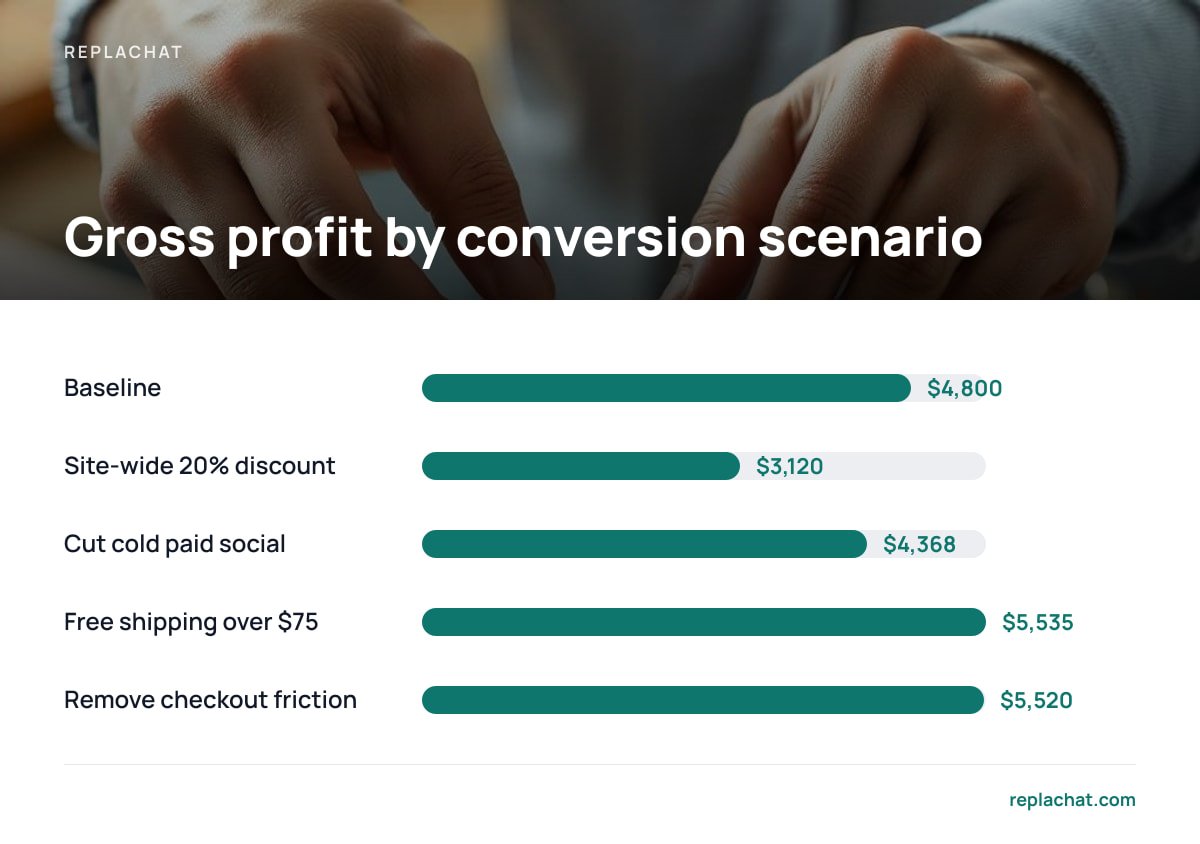
The table below is a hypothetical store: 10,000 monthly sessions, a 2% conversion rate, a $60 average order value and a 40% gross margin. Each row changes one thing.
| Scenario | Sessions | Conv. rate | AOV | Margin | Orders | Revenue | Gross profit |
|---|---|---|---|---|---|---|---|
| Baseline | 10,000 | 2.0% | $60 | 40% | 200 | $12,000 | $4,800 |
| Site-wide 20% discount | 10,000 | 2.6% | $48 | 25% | 260 | $12,480 | $3,120 |
| Cut cold paid social traffic | 7,000 | 2.6% | $60 | 40% | 182 | $10,920 | $4,368 |
| Free shipping over $75 | 10,000 | 2.2% | $68 | 37% | 220 | $14,960 | $5,535 |
| Remove checkout friction | 10,000 | 2.3% | $60 | 40% | 230 | $13,800 | $5,520 |
Look at the discount row first. Conversion rate rose 30% and revenue rose a little, but gross profit fell by $1,680. The reason is that every dollar of discount comes straight out of margin. Your product cost stays at $36 whether you sell the item for $60 or $48.
A 30% higher conversion rate, 35% less gross profit: that is what a site-wide 20% discount does to a store running a 40% margin.
The traffic-cut row is subtler. Dropping your weakest ad campaigns lifts the conversion rate and lowers gross profit. That trade can still be right if the ad spend you saved exceeds the $432 in lost profit. So treat it as an ad-spend decision, not a conversion win. The two rows we would pick first are the bottom two: a shipping threshold that lifts order value, and checkout fixes that lose nothing.
How to Increase Ecommerce Conversions: Fix the Leaks Before Adding Traffic
How do you convert more sales? Remove the reasons a ready buyer leaves, in order of how many buyers each one affects. Start at checkout, then work backward to the product page and page speed. More traffic poured into a leaking funnel simply leaks faster.
Surprise costs at checkout
Baymard Institute's cart abandonment research puts the documented average cart abandonment rate at around 70%. Extra costs such as shipping, taxes and fees are the most commonly cited reason. The fix is disclosure, not necessarily free shipping. Show the shipping cost or the free-shipping threshold on the product page and in the cart, before the buyer types an address.
Forced account creation
Baymard also lists being forced to create an account as a recurring abandonment reason. Offer guest checkout by default. Then invite the buyer to save their details on the confirmation page, after they have paid.
Slow and jumpy pages
Google's Core Web Vitals guidance sets "good" thresholds for each page. Largest Contentful Paint should come in under 2.5 seconds and Interaction to Next Paint under 200 milliseconds. Cumulative Layout Shift should stay under 0.1, measured at the 75th percentile of real visits. Speed matters commercially as well as for search. Deloitte's Milliseconds Make Millions study, commissioned by Google, linked a 0.1-second improvement in mobile site speed to an 8.4% increase in retail conversions.
0.1 seconds. In Deloitte's Milliseconds Make Millions study, that small an improvement in mobile site speed came with an 8.4% lift in retail conversions.
The usual culprits are uncompressed hero images, five tracking scripts nobody reads, and chat widgets that load before the product photo. Load anything non-essential after the main content.
Product pages that leave questions open
Buyers stall on specific questions. Will it fit? Does it work with what I already own? When will it arrive in my country? Answer the three questions your inbox gets most often directly beside the Add to Cart button. A sizing chart in a footer link does nothing for the visitor who never scrolls that far.
Missing trust signals at the point of payment
Put your return window, a real contact method and accepted payment logos near the payment button. Reviews on the homepage help less than one specific line at checkout, such as "30-day returns, prepaid label included."
Live Chat at the Moment of Doubt: Where It Converts and Where It Annoys

Live chat works when it answers the question a ready buyer cannot find on the page. It fails when it interrupts a browser who had no question at all. That one distinction decides where your chat bubble should open proactively and where it should sit quietly.
Proactive invitations earn their place on pages where hesitation is common:
- Shipping and returns pages. A visitor reading your returns policy is weighing a purchase, so this is where a short "Questions about delivery to your country?" lands well.
- Sizing and compatibility pages. These questions have exact answers, and a person can give them in one line.
- Checkout, after 45 to 60 seconds of inactivity. A stalled checkout usually means a problem, such as a failed card, a confusing field or a missing shipping option.
Keep it passive on the homepage and blog posts. A pop-up two seconds after landing trains visitors to close it. They then ignore it on the checkout page, where it would have helped.
Response time matters more than greeting copy. A chat answered in under a minute can save a sale. A chat answered tomorrow is just email with extra steps, so set your hours honestly and switch to an offline message form outside them. If you are deciding whether automation or people should answer first, our comparison of chatbot vs live chat explains when each one makes sense.
Pro Tip: Tag every chat with the page URL it started on. Then review the tags monthly. Pages that generate repeated chats about the same question need their copy fixed. Once the copy answers the question, those chats disappear and the page converts better without anyone typing.
Measuring What Actually Moved: Segments, Profit per Session and the Two-Week Rule
A conversion change is only real if it survives segmentation and a full sales cycle. Blended store-wide numbers hide most of what happens, because a mobile improvement and a desktop decline can cancel each other out.
Before you change anything, record these numbers for the previous four weeks, split by device and by traffic source:
- Conversion rate. Orders divided by sessions.
- Average order value. Revenue divided by orders.
- Gross profit per session. Gross profit divided by sessions. This is the number that settles arguments, because it captures rate, order value and margin together.
Run each change for at least two full weeks, so both weekends and a payday are included. Change one major thing at a time. If you change checkout, shipping thresholds and chat placement in the same week, you will never know which one worked.
Be careful reading chat reports. Visitors who start a chat often convert far better than visitors who do not, but much of that is selection bias. People who ask questions were already more interested. A fairer test is to turn proactive chat on for half your product categories and off for the other half. Then compare profit per session between the two halves.
Is Ecommerce Still Profitable in 2026? Yes, but the Margin Is Thinner
Ecommerce is still profitable in 2026 for stores that control costs, not for stores that rent growth. The U.S. Census Bureau's quarterly e-commerce report shows online sales making up roughly 16% of total U.S. retail sales and still growing. The demand is there.
What has changed is the cost side. Paid acquisition is more expensive than it was a few years ago, shipping costs have risen, and many store owners now run a dozen monthly software subscriptions. A store with a 2% conversion rate and a 40% margin has little room for any fixed cost that grows with traffic or headcount.
That is why the profitable stores in 2026 tend to share three habits:
- They sell more to people who already know them. Email and repeat customers convert at a fraction of the cost of cold traffic.
- They raise order value instead of cutting price. Bundles and shipping thresholds protect margin in a way that discounts do not.
- They audit software costs that scale with success. Tools billed per conversation or per seat get more expensive exactly as the store gets busier.
Running Several Shops Without a Monthly Tax on Every Conversation

If you run more than one store, the conversion advice above multiplies, and so does your software bill. Each shop needs chat on its checkout and shipping pages. Each needs its own branding so customers trust it. And each needs someone who knows its products answering questions.
Subscription chat tools usually charge per seat, per conversation or per workspace. That pricing punishes the exact things this article recommends. More proactive chats on high-intent pages means more billable conversations. Adding a part-time helper during peak season means another monthly seat. We break down the real numbers in what live chat for multiple stores really costs and in our guide to live chat software pricing for several shops.
Our position is plain. For a small team running several shops, a tool you pay for once and host yourself is the better trade, as long as someone on the team can manage a server. If nobody can, a subscription is the honest choice, and you should budget for how it scales. Small teams weighing that decision can start with live chat for small teams.
Get One Chat Inbox for Every Shop for $299, Paid Once
The fixes above depend on answering questions quickly on the right pages of every store. They also depend on not paying more each time a customer asks. ReplaChat is self-hosted live chat software that runs on your own server. It puts every shop's conversations in one shared inbox and gives each shop its own branded chat bubble. Owner, admin and agent roles let you decide which team members answer for which store. There are no per-agent fees, no monthly bill and no cap on conversations.
It costs $299 once and includes the complete source code, 12 months of updates and 30 days of setup support. The honest caveat is that self-hosting means you run the server, the backups and the updates after the support window ends. If that sounds like a burden, it is the wrong tool for you. To see how it behaves before you buy, try the live demo, which is set up with five shops and four team members.
Frequently Asked Questions
What is the average conversion rate for ecommerce?
Most published benchmarks put the average ecommerce conversion rate between roughly 2% and 3% of sessions. The figure varies widely by price point, traffic source and device. Your own store's segmented history is a more useful benchmark than any industry average.
Is a 2.5% conversion rate good?
A 2.5% conversion rate is roughly average for ecommerce. It is strong for high-priced items like furniture and weak for low-cost repeat purchases. Judge it alongside your average order value and gross profit per session.
How can I convert more sales without discounting?
Show shipping costs early, offer guest checkout and get your pages under Google's Core Web Vitals thresholds. Answer the most common pre-purchase questions beside the Add to Cart button. Use free-shipping thresholds or bundles to raise order value instead of cutting price.
Is ecommerce still profitable in 2026?
Yes, for stores that protect their margin. U.S. Census Bureau data shows online sales still growing as a share of retail. Rising ad, shipping and software costs mean profit now depends on repeat customers and on controlling costs that scale with traffic.
Does live chat increase ecommerce conversions?
It can, when it answers specific questions on shipping, sizing and checkout pages and replies within about a minute. It tends to hurt when it pops up on the homepage seconds after a visit begins. Test it by enabling proactive chat on some categories and comparing profit per session.
Sources
- Cart Abandonment Rate Statistics | Baymard Institute
- Web Vitals | Google web.dev
- Milliseconds Make Millions | Deloitte
- Quarterly Retail E-Commerce Sales | U.S. Census Bureau