
The right live chat software for a multi-shop owner depends more on how it charges than on its feature list. Per-agent and per-conversation subscriptions cost more as you add stores, staff and traffic. A self-hosted tool bought once costs about the same whether you run one shop or six. The real choice is between renting a service with no maintenance and owning a tool you have to look after yourself.
TL;DR:
- Pricing model matters more than features: per-seat, per-conversation, flat subscription and one-time self-hosted tools grow at very different rates as you add shops and staff.
- Your agent count is set by how many chats you handle at the same time at peak, not by total monthly volume, so measure concurrency before you buy seats.
- Multi-shop owners need one shared inbox, a separately branded widget per store, and access controls per shop. Many tools only manage two of the three.
- Self-hosting cuts out recurring fees and a third-party data processor. In return, you take on patching, TLS, backups and access control.
- Test any chat widget against Core Web Vitals and WCAG 2.2 before launch, because a floating bubble can slow your storefront and hide focused elements.
Table of Contents
- What You Actually Pay For in Live Chat Software
- Run the Numbers: Three Years of Chat Costs Across Several Shops
- The Multi-Shop Problem: One Inbox, Separate Brands
- Features That Earn Their Place, and Features That Pad the Plan
- Self-Hosting: What You Take On, and What You Get Back
- Speed and Accessibility: What the Chat Bubble Does to Your Storefront
- How to Choose: A Short Decision Checklist
- Get One Chat Inbox for Every Shop, Paid For Once
- Frequently Asked Questions
- Sources
What You Actually Pay For in Live Chat Software
Live chat software is sold on four pricing models. Most comparison pages blur them together. The model decides your bill far more than any single feature does, so pin it down first.
- Per agent (per seat). You pay a monthly fee for each person who can log in and answer. It looks cheap with one person and gets expensive when a part-timer covers weekends or a second shop needs its own staff.
- Per conversation or per resolution. You pay based on chat volume, or based on how many chats an automated assistant closes. It suits stores with low, steady traffic. A seasonal spike, a viral product or a shipping delay can multiply the bill in the month you can least afford it.
- Flat subscription with tiers. You pay one monthly price up to a cap on seats, conversations or sites. These caps often push you into the next tier at exactly the point where you add a store.
- One-time license, self-hosted. You pay once and run the software on your own server. Your ongoing costs are hosting and your own time, and neither grows with headcount or chat volume.
Each model fits someone. A solo founder with one store and modest traffic can live happily on a free or entry tier. If you run several shops, though, every growth step you take (another storefront, another helper, another busy season) moves you up a subscription price list. That growth is the problem a different pricing model can fix.
Run the Numbers: Three Years of Chat Costs Across Several Shops

Monthly pricing is easy to sign up for and hard to total. Work it out over three years, because that is roughly how long most owners keep a support tool before switching.
The table below uses illustrative assumptions, not any vendor's quoted price: three shops, four people answering chats, a per-seat rate of $25 per agent per month, and a small virtual server at about $10 per month for self-hosting. Replace these with your real quotes.
| Pricing model | How it scales | Year 1 | 3-year total | What changes it |
|---|---|---|---|---|
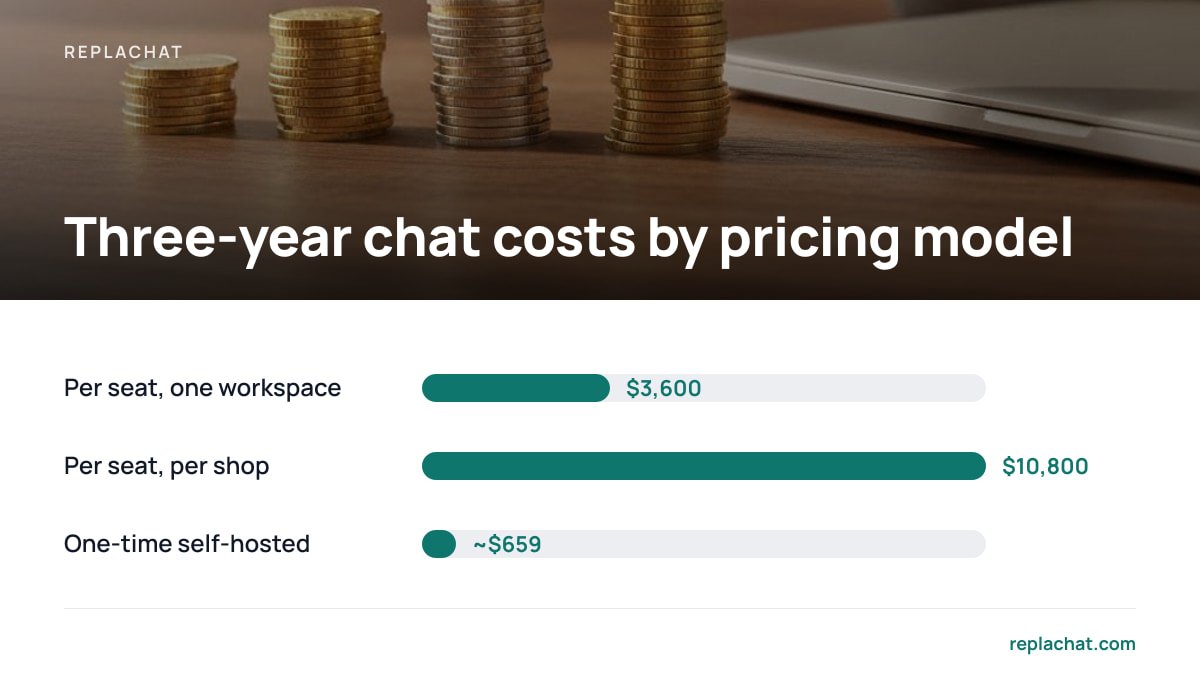
| Per seat, one workspace | 4 agents × $25 × 12 | $1,200 | $3,600 | Each new hire adds $300/year |
| Per seat, one workspace per shop | 4 agents × $25 × 12 × 3 shops | $3,600 | $10,800 | Each new shop multiplies the bill |
| Per conversation | Volume-based | Varies | Varies | Sales, launches, shipping delays |
| One-time license, self-hosted | $299 + ~$120/year hosting | ~$419 | ~$659 | Your time spent on maintenance |
The second row is the one to watch. Some hosted tools treat each website as a separate workspace or "brand," and seats don't carry over between them. If an agent answers for three shops, you may be paying for that person three times. Ask every vendor directly whether one seat covers all your sites.
Under a per-seat plan, one agent covering three separately billed shops costs the same as three agents. Under a one-time license, it costs nothing extra.
The self-hosted row is not free. Count a few hours a month for updates and monitoring, and value that time honestly. Even with your time priced in, the gap over three years is usually large enough to justify the work for a team of three or more.
Pro Tip: Before you buy any seats, export a month of chat history and find your peak concurrent conversations: the most chats open at the same moment. A competent agent can usually handle two or three text chats at once. If your peak is four simultaneous chats, you may need two people online, not the four your monthly volume suggests. Seat counts based on volume are where most chat overspending starts.
The Multi-Shop Problem: One Inbox, Separate Brands

Running several stores puts three requirements on a chat tool that a single-store owner never runs into. Most products handle one or two of them well and work around the third.
One shared inbox
Your team should see every open conversation from every shop in a single queue, labeled by store. Logging in and out of separate dashboards is how chats get missed at 9 p.m. on a Friday. One inbox also lets you spread the load: whoever is free takes the next chat, whatever site it came from.
A separately branded widget per shop
Customers on your outdoor-gear store should not see the colors, name or greeting from your skincare store. Each site needs its own bubble, with its own branding, welcome text and avatar, while still feeding the same back end. If the customer can tell your shops share a support system, the branding has failed.
Per-shop permissions
Not everyone should answer for every store. A contractor hired for one brand shouldn't read another brand's customer conversations, which may include addresses and order details. Look for roles that separate the people who configure the system (owner, admin) from the people who answer (agent), and that let you assign agents to specific shops.
This is also a security issue. The OWASP Top Ten, the web security community's most widely referenced awareness list, includes broken access control. That category covers the exact failure where a user can see data they were never meant to see. Per-shop permissions are that control applied to your support team.
Features That Earn Their Place, and Features That Pad the Plan
Chat pricing pages list dozens of features. For an ecommerce store, a short list does most of the work.
Worth paying for:
- Saved replies. Answers to "where is my order" and "do you ship to Canada" should take one click. This is the biggest time-saver in day-to-day support.
- Offline capture. When no one is online, the widget should collect an email and question rather than disappear. A missed chat with no contact details is a lost sale.
- Transcript export in a documented format. If you can't get your conversation history out, you can't leave. Check this before you commit, not after.
- Visitor context. Seeing which page a customer is on, and which shop they came from, cuts the back-and-forth in half.
Often padding:
- Bundled marketing automation. Pop-up campaigns and drip sequences are separate jobs, and you probably already have a tool for them.
- Elaborate chatbot builders. These are useful at high volume. For a small team, they're often a reason to justify a higher tier rather than a real need.
- Vanity analytics. "Average sentiment score" rarely changes a decision. First-response time and missed-chat counts do.
My view: buy the boring essentials and own them. Add automation once your volume proves you need it, not because a pricing tier bundled it in.
Self-Hosting: What You Take On, and What You Get Back

Self-hosted chat removes recurring fees, and it moves responsibility onto you. Go in knowing both sides.
What you take on:
- Patching. You apply updates to the chat software, the server operating system and the runtime. Unpatched servers are a common entry point for attackers.
- TLS. Chat traffic must run over HTTPS. Let's Encrypt issues free, automated certificates, so cost is no longer an excuse for running without encryption.
- Backups and uptime. No vendor pages you at 3 a.m. if the server goes down. Set up automated backups and a simple uptime monitor on day one.
What you get back:
- Data control. Customer conversations sit on infrastructure you chose, in the region you chose.
- Fewer processors to manage. Under the EU General Data Protection Regulation, Article 28 requires a written contract with any processor handling personal data on your behalf. Chapter V restricts transfers outside the European Economic Area. Self-hosting doesn't remove these obligations, since your hosting provider is still likely a processor. It does remove one more vendor, and one more set of transfer terms, from the chain.
- No price changes. A subscription vendor can reprice, cut a tier or retire a feature. Software you own keeps working as it did the day you installed it.
Article 32 of the GDPR also requires "appropriate technical and organisational measures" to secure personal data. If you self-host, that duty is concretely yours: encryption in transit, restricted access and the ability to restore after an incident. None of it is exotic, but someone has to own it.
Speed and Accessibility: What the Chat Bubble Does to Your Storefront
A chat widget is third-party JavaScript on your highest-value pages, including product pages and checkout. It can quietly hurt both conversion and compliance.
Google's Core Web Vitals set the "good" thresholds at a Largest Contentful Paint of 2.5 seconds or less, an Interaction to Next Paint of 200 milliseconds or less, and a Cumulative Layout Shift of 0.1 or less, measured at the 75th percentile of page loads. A heavy widget that loads early can push LCP back. A bubble that pops in and shoves content around can break the CLS budget.
Test your pages in Lighthouse or Chrome DevTools with the widget enabled and then blocked. If the difference is large, ask whether the script can load after the page has rendered, or only after the first user interaction.
Accessibility is the other check. WCAG 2.2, the W3C's current accessibility standard, added success criteria that bear directly on floating chat buttons:
- Focus Not Obscured (2.4.11, Level AA). A sticky chat bubble must not completely hide whichever element a keyboard user has focused, such as a "Add to cart" button in the bottom corner.
- Target Size (2.5.8, Level AA). Clickable targets need to be at least 24 by 24 CSS pixels, with limited exceptions.
- Status Messages (4.1.3, Level AA). New incoming messages should be announced to screen readers without stealing focus.
24 by 24 CSS pixels. That is the minimum target size WCAG 2.2 sets at Level AA, and it applies to the button that minimizes your chat window.
With self-hosted software and source code, you can fix these problems yourself instead of filing a request and waiting.
How to Choose: A Short Decision Checklist
Answer these in order. The first two usually decide it.
- How many shops and people will you have in 18 months? If the answer is one shop and one person, a free or entry hosted tier is fine. Don't overbuild. If it's several shops or several people, subscription costs will grow every time you grow.
- Is anyone comfortable running a small server? You don't need a sysadmin. You need someone who can apply updates, renew certificates and restore a backup. If no one is, budget for a freelancer or stay hosted.
- Do you need per-shop branding and per-shop permissions? If yes, check both in a demo, not on a feature grid.
- Can you export your transcripts? If not, rule the tool out.
- Does the widget pass your speed and accessibility tests? Check this on your real product pages.
Where I land: if you run two or more shops with two or more people answering, and you have even modest technical help, pick a one-time, self-hosted tool. Over three years, the subscription premium buys you very little that a careful setup doesn't already give you.
Get One Chat Inbox for Every Shop, Paid For Once
Replachat is built for the multi-shop setup this article describes. You install it on your own server for a one-time $299 payment. Every store gets its own branded chat bubble, and all conversations land in one shared inbox. Owner, admin and agent roles let you decide which team members can answer for which shop. There are no per-agent fees, no monthly bill and no cap on conversations. The license includes the complete source code, 12 months of updates and 30 days of setup support.
The honest limit: you are running it, so patching, backups, TLS and uptime are your responsibility, and there is no vendor watching your server overnight. Updates beyond the first 12 months are not part of the $299, so check the current terms before you buy. To see whether it fits, try the live demo, which is set up with five shops and four people, and test it against the checklist above.
Frequently Asked Questions
Is self-hosted live chat software actually cheaper than a subscription?
Usually it is over a multi-year period, especially once you have several agents or several shops. A one-time license plus a small server often costs less in three years than a single year of per-seat plans for a mid-sized team. You need to add in the time spent maintaining the server, which is the real trade-off.
How many chat agents does a small online store need?
Base the number on peak concurrent chats, not total monthly volume. A trained agent can usually handle two or three text conversations at once, so a store that rarely has more than three chats open at the same time can often run with one or two people online.
Does self-hosting live chat make me GDPR compliant?
No. Self-hosting alone doesn't make you compliant, though it can simplify things. You are still the data controller, your hosting provider is likely a processor that needs an Article 28 contract, and you must secure the data under Article 32. Self-hosting reduces the number of third parties handling your customers' conversations.
Can one chat tool serve several different branded stores?
Yes, if it supports a separately branded widget per site that feeds a single shared inbox. Check that seats aren't billed separately for each site and that you can restrict agents to specific shops. Many tools handle branding or a shared inbox but not both together with per-shop permissions.
Will a live chat widget slow down my store?
It can, because it adds third-party JavaScript to every page. Test your product and checkout pages with the widget enabled and then blocked, and compare against Google's Core Web Vitals thresholds. A widget that loads after the page renders, or after the first interaction, has much less effect.