
Live chat for multiple agents usually comes down to one question: does the bill grow every time you add a person? Most hosted chat tools charge per agent seat or per conversation, so your fourth hire costs you every month for as long as you keep them. A self-hosted tool bought once lets you add agents at no extra charge. What decides whether that works is how well it controls who can answer which shop.
TL;DR:
- Per-seat chat pricing turns every new agent into a permanent monthly charge, so headcount drives your bill more than features do.
- Over five years, a one-time license plus a small server can cost a fraction of four paid seats, but you take on hosting and maintenance.
- If you run several shops, you need per-shop permissions so agents see only the stores they actually support.
- OWASP ranks Broken Access Control as the top web application risk, which is why shared logins and blanket access are a real liability.
- Plan agent numbers around the hours you want covered, not around how many chats you get on an average day.
Table of Contents
- Why Seat Count, Not Features, Decides What Multiple Agents Cost
- Per-Seat vs. Per-Conversation vs. One-Time: The Five-Year Math
- Live Chat for Multiple Agents Across Multiple Shops: Routing and Permissions
- Least Privilege Isn't Paranoia: Why Agent Access Should Be Scoped Per Shop
- Running Chat on Your Own Server: What Changes for Data and Compliance
- How Many Agents Do You Actually Need? Plan for Coverage, Not Volume
- Mistakes Teams Make When Adding Their Third, Fourth and Fifth Agent
- Add Every Agent You Need for a One-Time $299
- Frequently Asked Questions
- Sources
Why Seat Count, Not Features, Decides What Multiple Agents Cost
When you compare chat tools, the feature lists look alike: a widget, an inbox, canned replies, transcripts, maybe a mobile app. What separates them is how the price scales once more than one person needs to answer chats.
Hosted chat tools generally use one of three pricing models. Per-seat pricing charges a monthly fee for each agent who can log in. Per-conversation or usage pricing charges by chat volume, often in tiers. One-time licensing charges once for the software, and you run it yourself. The first two share a feature you only notice later: the cost never stops, and it rises as your business does.
That matters most to owners running several shops. Each new store brings more chats. More chats bring more agents, and on a per-seat plan, more agents mean a higher bill every month. Growth gets taxed twice. If you want the full pricing breakdown, our guide to live chat software for multiple shops and per-seat pricing goes through the models one at a time.
My position is simple. If you expect to have three or more people answering chat for the next few years, per-seat pricing is the most expensive way to buy chat software. The numbers below show why.
Per-Seat vs. Per-Conversation vs. One-Time: The Five-Year Math
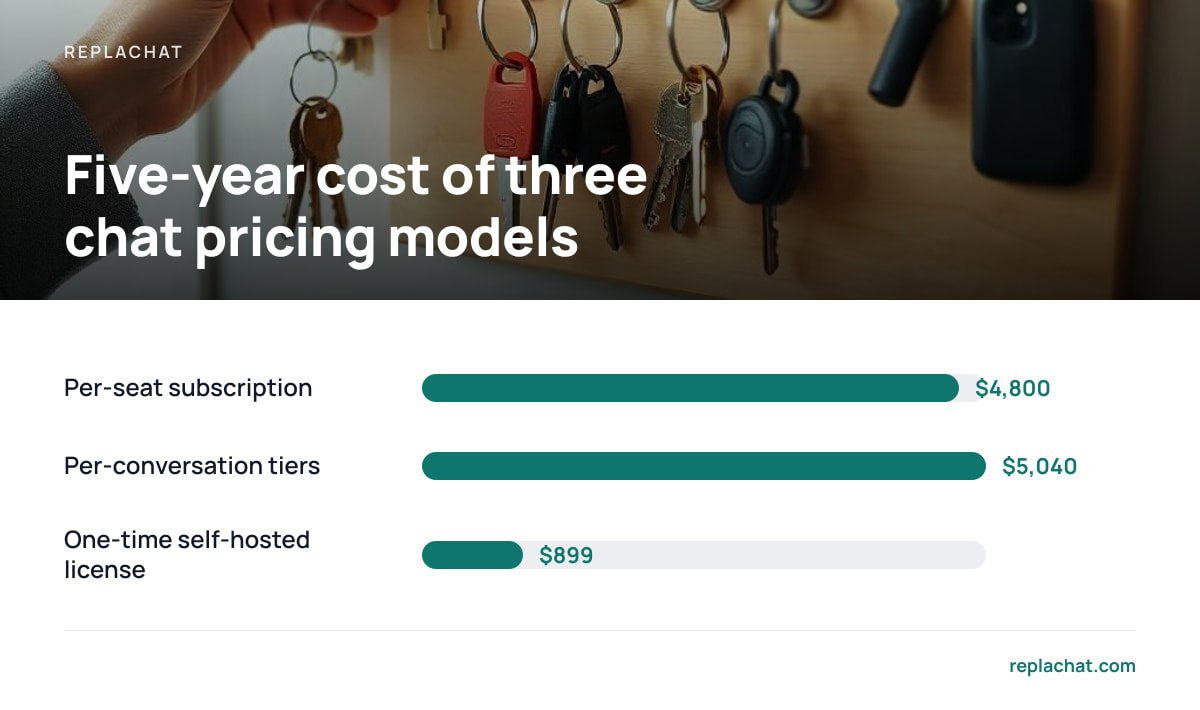
The figures in this table are illustrative, not quotes from any vendor. Replace them with the prices you're actually being offered. The structure of the math stays the same whatever the numbers are.
| Model | Assumption (illustrative) | Year 1 | Five-year total | What makes it grow |
|---|---|---|---|---|
| Per-seat subscription | 4 agents × $20/seat/month | $960 | $4,800 | Every agent you add |
| Per-conversation tiers | $60/month tier, upgraded to $120 in year 3 | $720 | $5,040 | Chat volume across all shops |
| One-time self-hosted license | $299 license + $10/month server | $419 | $899 | Server size, your own time |
Two things in this table deserve a closer look.
- The self-hosted line isn't free after the license. You pay for a server, and someone has to apply updates, take backups and keep the operating system patched. If nobody on your team can do that, budget for a contractor a few hours a year.
- The subscription lines usually understate the real cost. Seat counts rarely stay at four. Seasonal staff, a freelancer covering weekends, or an owner who wants a login "just to watch" all add up. On per-seat pricing, each of those people costs money.
Four agents at an illustrative $20 a seat is $4,800 over five years. The same team on a $299 one-time license and a $10 server is $899, and a fifth agent changes neither number.
Live Chat for Multiple Agents Across Multiple Shops: Routing and Permissions
Adding agents is the easy part. The hard part is deciding what each agent can see and do once they are in, especially when one inbox covers several stores.
One Shared Inbox, Separately Branded Bubbles
Customers should see a chat bubble that matches the shop they're on: its colors, its name, its greeting. Your team should see one inbox where every conversation is clearly tagged with the shop it came from. If you skip either half, you get confused customers or agents juggling five browser tabs.
Owner, Admin and Agent Roles
A three-tier role model covers most small teams:
- Owner. Controls billing, server settings and who has admin access. This is usually one person, and it should stay that way.
- Admin. Adds and removes agents, assigns shops, edits canned replies and widget branding. Give this role to a trusted manager, not to everyone who asks.
- Agent. Answers chats in the shops they're assigned to, and nothing else. Most of your team should sit here.
Per-Shop Assignment
The key control is shop-level access. The agent who handles your skincare store doesn't need to read conversations from your supplements store, and in some cases shouldn't. Per-shop assignment keeps chat queues relevant, cuts down on wrong answers about the wrong store's return policy, and limits how much customer data any one login can reach.
If you sell on Shopify, check how far the platform's built-in chat covers multi-store teams before you add anything. Our explainer on what Shopify's Inbox covers and where it stops goes through those limits.
Least Privilege Isn't Paranoia: Why Agent Access Should Be Scoped Per Shop

Giving every agent access to everything feels convenient. It's also the most common way access problems start.
The OWASP Top 10, the most widely cited list of web application security risks, put Broken Access Control in first place in its 2021 edition. In plain terms, users being able to see or do things they shouldn't was the most serious category of web app weakness OWASP identified. A chat inbox full of customer names, email addresses, order numbers and occasionally home addresses is exactly the kind of data that category is about.
OWASP ranked Broken Access Control the number-one web application security risk in its 2021 Top 10, ahead of injection and cryptographic failures.
The fix has a name. The NIST Computer Security Resource Center defines least privilege as designing systems so each entity gets only the minimum resources and authorizations it needs to do its job. For a chat team, that means agents see their own shops, admins manage their own team, and only the owner touches server settings.
Per-seat pricing quietly works against this. When every login costs money, teams start sharing logins, and shared logins make least privilege impossible to apply.
Pro Tip: Give every person their own named account, even if they only cover one Saturday a month, and never create a shared "support@" login. Individual accounts are how you find out who promised a customer a refund that wasn't approved, and how you cut off one departing freelancer without resetting everyone's password. With a flat license, the extra account costs nothing. That removes the only reason teams ever share logins.
Running Chat on Your Own Server: What Changes for Data and Compliance

When you self-host, chat transcripts sit on infrastructure you control rather than on a chat vendor's servers. That changes your obligations without removing them.
- Fewer parties touch the data. Under Article 28 of the GDPR, when another company processes personal data on your behalf, you need a written contract that governs how it does so. A self-hosted chat tool means the software vendor isn't storing your transcripts. Your hosting provider may still count as a processor, so check its data processing terms.
- Security becomes your job. Article 32 of the GDPR requires appropriate technical and organizational measures to secure personal data, including ongoing confidentiality and the ability to restore access after an incident. On your own server, that means encrypted connections, regular backups you have actually tested restoring, and prompt patching.
- Retention is in your hands. You decide how long transcripts are kept and when they're deleted. Set a policy and write it down. Keeping every chat forever "just in case" is a liability, not an asset.
This isn't legal advice, and the rules differ by country. The practical point holds everywhere, though: self-hosting gives you more control and puts more responsibility on you. Choose it with your eyes open.
How Many Agents Do You Actually Need? Plan for Coverage, Not Volume

Owners often size their chat team by average daily chat volume. The better starting point is the number of hours you promise to be available.
Say you want chat answered from 8 a.m. to 10 p.m., seven days a week. That's 98 hours of coverage a week. One full-time person works about 40. Before you account for a single sick day, holiday or lunch break, you need roughly two and a half people just to keep the bubble staffed.
Then adjust for how your shops actually behave:
- Overlap at peaks. If chats spike after an email campaign or during evening hours, schedule two people for those windows instead of spreading staff evenly.
- Shop-specific knowledge. Agents who know one product line well answer faster and more accurately. Assigning two agents per shop, with some overlap, usually beats having everyone cover everything.
- Seasonal surges. Fourth-quarter sales and launch weeks can multiply chat volume. With a flat license you can add temporary agents and remove them afterward without a billing change.
If you can't staff the hours, shorten them. A bubble that switches to an email form after 6 p.m. is better than one that shows "online" while nobody answers.
Mistakes Teams Make When Adding Their Third, Fourth and Fifth Agent
Small chat teams run smoothly on habit. Somewhere around the third agent, habit stops being enough.
- No ownership rule for open chats. Two agents reply to the same customer with different answers. Agree that the first person to reply owns the conversation until it's closed or formally handed off.
- Canned replies that ignore the shop. A return policy answer written for one store gets pasted into another store with different terms. Keep canned replies per shop, and label them clearly.
- Admin access as a reward. Promoting a good agent to admin "because they've earned it" widens access without a reason. Give admin rights to people who need to manage others, not to people you trust.
- No offboarding checklist. When someone leaves, remove their account the same day. Then review which shops they could reach and whether any canned replies or settings they changed need checking.
- Ignoring transcript review. Read a sample of each agent's chats every week. It's the cheapest training tool you have, and it catches policy drift early.
Add Every Agent You Need for a One-Time $299
Replachat is built for the setup this article describes: several shops, one shared inbox, a separately branded chat bubble for each store, and owner, admin and agent roles you can scope shop by shop. It costs $299 once. There are no per-agent fees, no monthly bill and no cap on conversations, so your fifth or tenth agent costs nothing extra. You get the complete source code, 12 months of updates and 30 days of setup support. A live demo with five shops and four people shows how the permissions work before you buy.
The honest limit: Replachat runs on your server, so hosting, backups and security patching are yours to handle. If nobody on your team is comfortable managing a server, factor that in, and check the system requirements against your hosting plan before you buy.
Frequently Asked Questions
Can multiple agents answer live chat at the same time?
Yes. Any multi-agent chat tool lets several people stay logged in and take conversations at once. What varies is the price: per-seat tools charge for each concurrent login, while a one-time self-hosted license lets you add agents without changing your bill.
How do I stop agents from seeing chats from shops they don't support?
Use a tool with per-shop permissions, then assign each agent only to the stores they handle. This follows the least-privilege principle and reduces wrong answers about another store's policies. Keep admin access to the few people who manage the team.
Is self-hosted live chat cheaper than a per-seat subscription?
For teams with three or more agents over several years, usually yes, because the license is paid once and adding agents costs nothing. You do pay for a server and take on maintenance, updates and backups. Run the five-year math using your own seat prices and hosting costs.
Does self-hosting chat help with GDPR?
It can reduce how many third parties process your customers' chat data, because the software vendor isn't storing transcripts. You still need to meet the GDPR's security requirements yourself, and your hosting provider may count as a processor. Get legal advice for your specific situation.
How many chat agents does a small ecommerce business need?
Start from the hours you want to cover, not your average chat volume. Covering 98 hours a week takes about two and a half full-time people before holidays and sick days. Add overlap during known peaks, such as evenings or campaign launches.
Sources
- OWASP Top Ten | OWASP Foundation
- Least Privilege (Glossary) | NIST Computer Security Resource Center
- Art. 28 GDPR – Processor | gdpr-info.eu
- Art. 32 GDPR – Security of processing | gdpr-info.eu