
Running live chat across multiple stores costs more than one store times the sticker price. Most subscription tools count seats or conversations per account, so every extra shop can quietly multiply your bill. The useful distinction is between separate accounts per store, which duplicate seats and caps, and one shared inbox serving every store, which keeps each shop's branding without duplicating them. For most multi-store owners, the shared inbox is the setup to pick.
TL;DR:
- Separate chat accounts per store multiply your seats. Four stores and three agents can mean paying for 12 seats.
- Conversation caps are the second multiplier. Check whether limits pool across stores or apply to each site, and whether bot-only chats count.
- A shared inbox only works if it tags every chat by store and scopes canned replies, so agents never quote the wrong return policy.
- Per-store permissions matter for GDPR as well as tidiness. Agents should see only the customers of the shops they serve.
- Run a three-year cost check before you sign. With several shops, a one-time licence plus a small server usually beats a recurring bill.
Table of Contents
- Why Multiple Stores Break Per-Store Chat Pricing
- Three Ways To Run Live Chat Across Multiple Stores
- The Conversation-Cap Problem: When Multiple Stores Share One Limit
- What a Shared Inbox for Multiple Stores Must Get Right
- Permissions and Customer Data: Who Sees Which Store's Buyers
- A Three-Year Cost Check You Can Run in Ten Minutes
- Run Every Store's Chat From One Inbox for One $299 Payment
- Frequently Asked Questions
- Sources
Why Multiple Stores Break Per-Store Chat Pricing

Chat pricing is built around a single website. You get one widget, one team and one monthly bill. That model holds until you open a second shop. Then every pricing variable the vendor uses (seats, conversations, AI resolutions, "projects") starts counting twice.
The pattern is familiar from the platforms themselves. Shopify's Help Center treats each store as its own store with its own plan and billing. Most chat tools copy that logic. If you install the chat app separately on each shop, you get a separate subscription for each one, and usually a separate seat for every person who answers chats there.
Paying for software doesn't hurt much. Paying for the same person four times does. If one agent covers your apparel shop, your accessories shop and your outlet, that agent has one pair of hands. A per-account model still bills them as three seats.
You can see how this plays out by team size in our breakdown of live chat software pricing for multiple shops.
Three Ways To Run Live Chat Across Multiple Stores
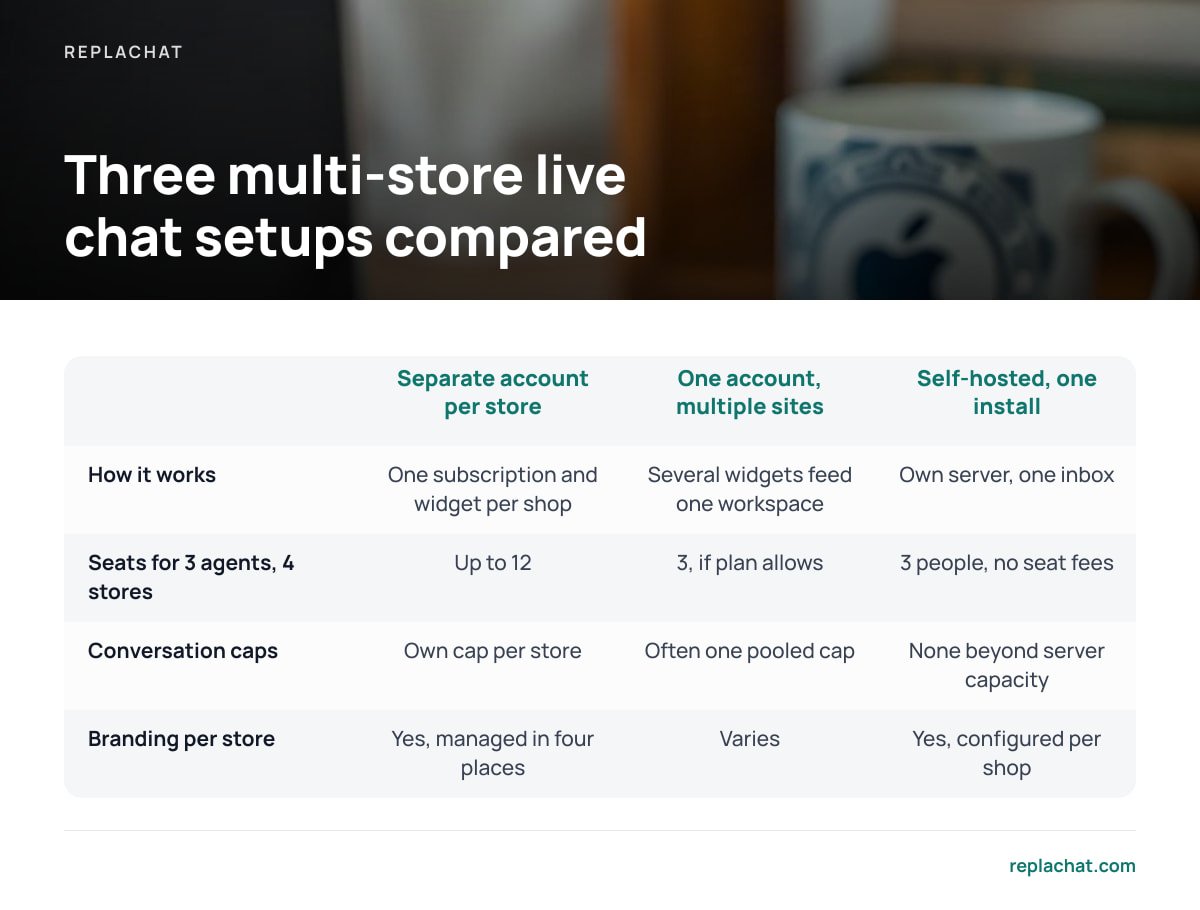
You have three realistic setups when you run several shops. They differ less in features than in what gets duplicated.
| Setup | How it works | Seats billed for 3 agents, 4 stores | Conversation caps | Branding per store |
|---|---|---|---|---|
| Separate account per store | One subscription and widget per shop | Up to 12 | Each store has its own cap, and so its own overage | Yes, but managed in four places |
| One account, multiple sites | Several widgets feed one workspace | 3, if the plan allows multiple sites | Often one pooled cap shared by every store | Varies; sometimes one look for all |
| Self-hosted, one install | Your own server runs one inbox for every shop | 3 people, no seat fees | None beyond your server's capacity | Yes, configured per shop |
Separate accounts. This setup is the easiest to start with and the most expensive to keep. Agents switch between tabs, customer history is split across tools, and a returning buyer who shops at two of your stores shows up as two strangers.
One account, multiple sites. This is better, but read the plan carefully. Some tiers allow only one website. Others allow several but pool a single monthly conversation limit, so a busy sale on one store can use up the allowance for all of them.
Self-hosted. You trade a monthly bill for responsibility. You run the server, apply updates and own the data. With several shops, that trade usually pays off. With one shop and low traffic, it may not.
Four stores, three agents, separate accounts: 12 seats. Multiply the seat count, not the sticker price.
My pick for anyone running three or more shops is one inbox serving every store. Whether that inbox should be hosted or self-hosted depends on your tolerance for running a server. Duplicated accounts are the setup to avoid.
The Conversation-Cap Problem: When Multiple Stores Share One Limit
Seats are the obvious multiplier. Conversation limits are the hidden one. Many subscription tiers include a set number of conversations a month, then upgrade you or charge overage once you pass it.
With one store, you can predict that number. With multiple stores, your traffic peaks at different times. A product launch on one shop, a holiday promotion on another and a shipping delay on a third can all land in the same month. If the cap is pooled, one store's busy week eats into everyone's allowance. If the cap applies to each store separately, you pay for headroom on every shop, including the quiet ones.
The stakes aren't abstract. Baymard Institute's running average of documented cart abandonment studies sits at roughly 70%. A chat window that goes quiet because you hit a limit mid-month removes a recovery tool at exactly the moment you have the most traffic.
Pro Tip: Before you sign, email the vendor three specific questions and keep the written answers. Do conversation limits apply per workspace or per website? Do chats handled entirely by a bot count toward the limit? Does a returning visitor who reopens a closed chat count as a new conversation? The answers often decide the real price more than the plan name does, and pricing pages rarely spell them out.
If bots are part of how you plan to stay under a cap, read chatbot vs live chat first. Automation that counts as a billable conversation doesn't save you anything.
What a Shared Inbox for Multiple Stores Must Get Right

A shared inbox removes the duplication. It also creates a new risk: an agent answering a customer of Store A with Store B's policies. These are the features that prevent that.
A visible store tag on every conversation
Every chat should show which shop it came from before the agent types a word. A colored label or a store-name prefix in the thread list both work. Without one, mistakes are only a matter of time.
Chat bubbles branded per store
Customers should never see another of your brands in the widget. Each shop needs its own colors, greeting, avatar and offline message. That way, an inbox shared behind the scenes stays invisible to buyers.
Canned replies scoped to the right shop
Return windows, shipping cutoffs and discount codes differ between stores. Saved replies should be filtered by store, so an agent working a chat from your outlet shop can't insert your premium shop's 60-day return promise.
Per-store permissions and roles
Some people should see every shop. Others should see only one. At minimum, you need an owner role, an admin role and an agent role that can be limited to specific stores. We cover this in more depth in live chat for multiple agents.
An accessible widget on every storefront
Every branded bubble still has to work for every customer. The W3C's WCAG 2.2 requires that functionality be operable by keyboard (success criterion 2.1.1) and that keyboard focus be visible. Test each store's widget by tabbing to it, opening it and sending a message without touching a mouse.
Permissions and Customer Data: Who Sees Which Store's Buyers

Multi-store owners often treat permissions as an organizational nicety. Under European data protection law, they are closer to an obligation. The General Data Protection Regulation sets out data minimization in Article 5(1)(c). Personal data should be limited to what is necessary for the purpose. An agent hired to support one shop doesn't need the order questions, emails and addresses of customers from your other four.
Where your chat data lives also changes your paperwork. If a third-party chat service stores your customer conversations, it is generally acting as your processor, and GDPR Article 28 requires a written contract with it. When you self-host, the conversation data sits on infrastructure you control. Your hosting provider may still count as a processor, but you decide where the server is located, how long chats are kept and who can export them.
Data minimization is a GDPR principle, Article 5(1)(c), not a preference. Store-level permissions are how you apply it in a chat inbox.
In practice, set this up on day one rather than after a hire. Give each agent access only to the stores they actually serve. Keep admin rights to the people who manage settings, and review the list whenever someone changes role or leaves.
A Three-Year Cost Check You Can Run in Ten Minutes
You don't need a spreadsheet template, just four numbers: how many stores you run, how many people answer chats, your expected monthly conversations, and how long you plan to keep the tool. Three years is a fair horizon for software your customers touch every day.
Here is an illustrative example. The figures are hypothetical, so plug in the real prices from any plan you're considering. Say a subscription tool charges $29 per seat per month, and you run four stores with three agents.
| Scenario | Monthly | 36 months | Notes |
|---|---|---|---|
| Separate account per store | 12 seats × $29 = $348 | $12,528 | Before any conversation overage |
| One account, multiple sites | 3 seats × $29 = $87 | $3,132 | If the plan allows several sites; pooled cap may force an upgrade |
| Self-hosted, one-time licence | Server only, roughly $5–$20 | $299 licence + $180–$720 hosting | Plus your time for updates and backups |
Two things stand out. First, the gap between separate accounts and a shared inbox is larger than the gap between any two vendors' list prices. Fixing your setup matters more than shopping for a discount. Second, self-hosting isn't free. Count the hours you or a developer will spend on updates, backups and the occasional fix. If that time is worth more to you than the subscription, pay the subscription.
If your team is still small, the reasoning in live chat for small teams covers when seat-based pricing starts to bite. If one of your shops runs on Shopify, also check what Shopify's built-in chat covers before you pay for anything.
Run Every Store's Chat From One Inbox for One $299 Payment
Replachat is built for the problem this article describes. It is self-hosted live chat that puts every shop into one inbox, with a separately branded chat bubble for each store and per-shop permissions using owner, admin and agent roles. There are no per-agent fees, no monthly bill and no conversation cap. A fifth store or a fourth teammate costs nothing extra.
The licence is a one-time $299. It includes the complete source code, 12 months of updates and 30 days of setup support. The honest caveat: you run it on your own server, so hosting, backups and uptime are your responsibility. After the first 12 months, updates aren't part of the original purchase. Check the server requirements on our spec sheet before you buy, then try the live demo with five shops and four people to see whether Replachat's inbox fits the way your team works.
Frequently Asked Questions
Can I use one live chat account for multiple stores?
Often yes, but it depends on the plan. Some subscription tiers allow only one website per account. Others allow several but pool a single monthly conversation limit across all of them, so check both before you consolidate.
Why does live chat get so expensive with multiple stores?
Most chat tools bill per seat, per conversation or per account. If each store has its own account, the same agent is billed once per store, and each shop carries its own conversation allowance. Four stores with three agents can mean paying for 12 seats.
Do conversation limits apply per store or per account?
It varies by vendor and plan, and pricing pages rarely say clearly. Ask in writing whether limits apply per workspace or per website, and whether bot-only chats count. Those answers often determine your real monthly cost.
How do I stop agents replying with the wrong store's policies?
Use an inbox that tags every conversation with its source store and scopes canned replies to each shop. Then an agent handling one store can't insert another store's return window or discount code by mistake.
Is self-hosted live chat worth it for multiple stores?
It usually pays off once you run three or more shops, because a one-time licence and a small server cost less over three years than recurring seat fees. The trade-off is responsibility: you handle hosting, updates and backups yourself.
Sources
- Shopify Help Center | Shopify
- Cart Abandonment Rate Statistics | Baymard Institute
- General Data Protection Regulation (GDPR) | gdpr-info.eu
- Web Content Accessibility Guidelines (WCAG) 2.2 | W3C