
The best live chat setup for small teams is one whose cost stays flat when you add a person or a shop. Per-seat and per-conversation plans look cheap with one agent and one store. They grow quickly once you hire a part-timer or launch a second brand. If you run several shops with two to five people, a self-hosted tool with a one-time license usually pays for itself within a year, as long as someone on your team can look after a server.
TL;DR:
- Per-seat chat pricing charges you more for growing, and small teams feel each new seat because every person covers several jobs.
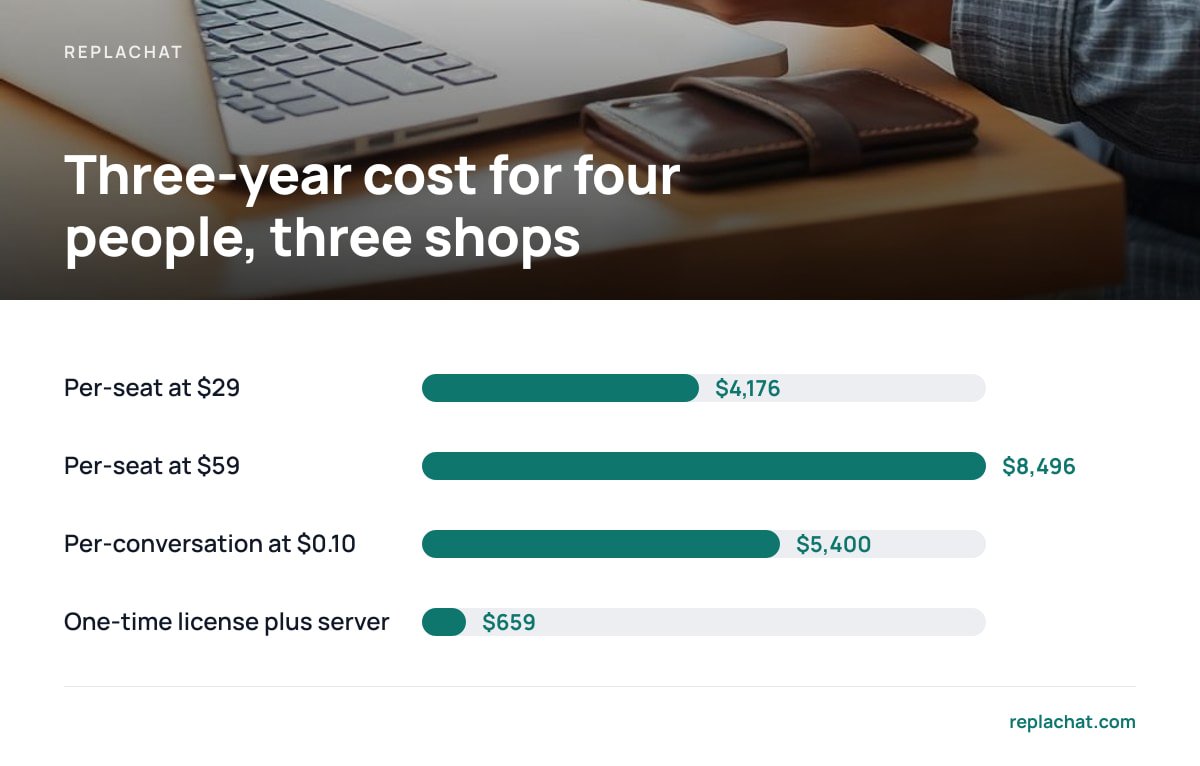
- Over three years, four agents at an illustrative $29 per seat cost about $4,176, while a one-time license plus a small server costs roughly $659.
- For a small team running several shops, the features that matter are one shared inbox, a separately branded chat bubble per shop, and per-shop permissions.
- Self-hosting moves work onto you: TLS certificates, updates, backups and data-protection paperwork. Budget a few hours a month for it.
- Fast replies matter more than extra features. A three-person team that answers within minutes will beat a ten-feature tool that nobody watches.
Table of Contents
- Why Seat Pricing Hurts Small Teams Running Several Shops
- The Three-Year Math: Per-Seat, Per-Conversation and One-Time Licenses
- What a Small Team Actually Needs From Chat, and What It Can Skip
- Fast Replies Beat Features When You Have Three People
- Self-Hosting Honestly: The Work You Take On
- Which Option We'd Pick, by Team Shape
- Run Every Shop's Chat From One Inbox for $299, Once
- Frequently Asked Questions
- Sources
Why Seat Pricing Hurts Small Teams Running Several Shops

Per-seat pricing assumes each seat is one full-time support agent. Small teams don't work that way. Your warehouse lead answers shipping questions on Tuesday afternoons. Your co-founder covers evenings. A seasonal hire helps for six weeks before Black Friday. Each of them needs a login, and on a per-seat plan each login is billed every month, whether that person handles 400 chats or four.
Running several shops makes this worse. Many hosted chat tools treat each storefront as a separate workspace or charge for extra "brands." An owner with three shops can end up paying three subscriptions, or one subscription with a multi-brand add-on, for the same three people.
Per-conversation pricing looks like the fix but carries a different risk. Your bill rises in your busiest months, which are the months you can least afford surprises. A promotion that brings in more chats also brings a bigger invoice, so the tool costs the most exactly when it is working hardest.
We've covered the full range of pricing models in our breakdown of live chat software pricing for multiple shops. The short version: small teams should first look at how the bill changes when headcount or shop count goes up by one.
The Three-Year Math: Per-Seat, Per-Conversation and One-Time Licenses
Monthly prices are designed to look small. The useful comparison is total cost over the period you will actually use the tool. For a small ecommerce business, three years is a realistic horizon. The figures below are illustrative. Swap in the real quotes you have been given.
| Scenario (4 people, 3 shops) | Year 1 | Year 3 total | What makes it go up |
|---|---|---|---|
| Per-seat SaaS at $29/seat/month | $1,392 | $4,176 | Every new hire or part-timer |
| Per-seat SaaS at $59/seat/month (mid tier) | $2,832 | $8,496 | Every new hire, plus tier upgrades for key features |
| Per-conversation SaaS, ~1,500 chats/month at $0.10 | $1,800 | $5,400 | Sales, launches, holiday peaks |
| One-time license ($299) + $10/month server | $419 | $659 | Your own time maintaining it |
Four agents at $29 a seat comes to $4,176 over three years. A $299 license on a $10-a-month server comes to $659.
The last row has a hidden cost: your time. If you spend three hours a month on updates and backups and value that time at $40 an hour, add about $1,440 a year. That brings the self-hosted total close to the cheapest per-seat plan in year one. It still comes out well ahead by year three, and the gap widens with every person you add. If nobody on your team will do that work, the math changes, and you should be honest about that before you buy.
What a Small Team Actually Needs From Chat, and What It Can Skip
Feature lists are long because they are built to justify higher tiers. A two-to-five-person team running several shops needs only a few things.
One inbox across every shop
A single queue. Your three people should never have to check three dashboards. Every conversation from every shop should land in one inbox, tagged with the shop it came from, so whoever is free can pick it up.
A branded bubble per shop
Separate identities on the front end. Customers of your candle brand should see the candle brand's colors, name and greeting, not your pet-supply store's. One shared back end with distinct front ends is the setup that fits a multi-shop business.
Per-shop permissions
Control over who answers what. Your seasonal hire may only need access to one store. Your bookkeeper might need read-only access. Owner, admin and agent roles, scoped per shop, keep access tidy without separate accounts.
What you can skip at this size
Chatbots, AI deflection and complex routing. These help when you get thousands of chats a day. At a few dozen a day, a well-written canned reply and a human who answers quickly will do better. Built-in CRM suites are similar. Your ecommerce platform already holds the order history.
If you run on a single hosted storefront platform, its built-in inbox may be enough for now. We explain where that option runs out in our guide to Shopify chat and where Inbox stops.
Fast Replies Beat Features When You Have Three People

Speed is what customers notice. A Harvard Business Review study of online sales leads found that firms that contacted a lead within an hour were nearly seven times as likely to qualify it as firms that waited longer. That research was about B2B leads, not shop chats, but the principle carries over: interest drops off quickly.
For a shop, the moment to catch is the buyer hesitating at checkout. Baymard Institute's compiled research on cart abandonment puts the average documented rate at around 70 percent. Live chat won't fix most of that, since many abandoners were only browsing. It does recover the ones stuck on a sizing question or a shipping date.
That has a practical consequence for small teams. A tool that charges per seat pushes you to give fewer people access, so fewer people are available to reply. Flat pricing lets you give everyone a login and set up a simple rota.
Pro Tip: Give every team member a login, but turn on notifications for only one person per time block. Rotate it on a shared calendar. More logins with fewer alerts produces faster replies than "everyone gets pinged," because when everyone gets pinged, everyone assumes someone else will answer.
Self-Hosting Honestly: The Work You Take On

Self-hosted chat means the software runs on a server you control. You get flat costs and full ownership of your conversation data. You also take on the jobs a hosted vendor used to handle. Here they are:
- TLS certificates. Your chat endpoint must be served over HTTPS. Let's Encrypt issues free, automatically renewing certificates. Set up renewal once and then confirm it runs.
- Updates and security patches. Apply updates promptly. The OWASP Top 10 is a good short list of the web-app risks you should care about, including outdated components and broken access control.
- Backups. Back up the database every day to a different location from the server. Test a restore every quarter. A backup you have never restored is only an assumption.
- Data-protection paperwork. If you sell to customers in the EU, chat transcripts are personal data. Self-hosting takes the chat vendor out of the processing chain, but your hosting company is still a processor. Article 28 of the GDPR requires a written contract with processors, and most reputable hosts provide a standard data processing agreement.
- Uptime. Run chat on its own small server or subdomain, separate from your storefront. A traffic spike in one should not take down the other.
Test a restore every quarter. A backup you have never restored is only an assumption.
None of this is hard if someone on your team has run a WordPress site or a VPS before. It is a real burden if nobody has.
Which Option We'd Pick, by Team Shape
We sell self-hosted software, so take our view with that in mind. We'll still tell you where it doesn't fit.
- One person, one shop, low volume. Use your store platform's built-in chat or a free hosted tier. Paying for anything else is premature.
- Two to five people, two or more shops, someone technical on hand. Self-hosted with a one-time license. This is where per-seat pricing hurts most and where the ownership trade-off pays off fastest.
- Two to five people, several shops, nobody technical. Either pay for setup help or accept a hosted plan for now. A neglected self-hosted server is worse than a fair subscription.
- Ten or more agents, heavy automation needs. A full hosted helpdesk may justify its cost through workflows a small team doesn't need.
If you fit the second profile, we think you should own your chat rather than rent it. You probably already have a VPS somewhere, and three years of seat fees is real money that could go toward stock.
Run Every Shop's Chat From One Inbox for $299, Once
Replachat was built for the multi-shop, small-team setup described above. You pay $299 once and run it on your own server. You get one shared inbox for every store, a separately branded chat bubble on each shop, and per-shop permissions with owner, admin and agent roles. There are no per-agent fees, no monthly bill and no cap on conversations, so adding a seasonal hire or a fourth store doesn't change what you pay.
The license includes the complete source code, 12 months of updates and 30 days of setup support. One honest limit: you are responsible for the server, the backups and the patching after setup. If nobody on your team is comfortable with that, it isn't the right choice yet. Before you buy, try the live demo, which has five shops and four people, and check the requirements against your hosting.
Frequently Asked Questions
What is the cheapest live chat option for small teams with several shops?
Over a multi-year horizon, a self-hosted tool with a one-time license is usually cheapest, because cost doesn't rise with each agent or shop. For example, a $299 license plus a $10-a-month server totals about $659 over three years. Per-seat plans for four people commonly run several thousand dollars over the same period.
Is per-conversation pricing better than per-seat pricing for a small team?
It can be cheaper in quiet months, but it charges the most during sales and holiday peaks, when cash flow is under the most pressure. It also makes the bill hard to predict. Small teams that value predictable costs generally do better with flat pricing.
How much technical skill do I need to self-host live chat?
Roughly the skill needed to run a WordPress site or a basic VPS: installing software, setting up an HTTPS certificate, applying updates and scheduling backups. If nobody on your team has done that, budget for setup help or choose a hosted option for now.
Does self-hosting chat make GDPR compliance easier?
It removes the chat vendor from your data-processing chain, so there is one fewer third party handling customer transcripts. Your hosting provider still processes the data, so you need a data processing agreement with them under Article 28 of the GDPR. You remain responsible for security, retention and access requests.
Do small teams need AI chatbots in their live chat tool?
Usually not at a few dozen chats a day. Quick human replies and a handful of well-written canned responses tend to work better and cost nothing extra. Automation starts to pay off at much higher volumes.
Sources
- The Short Life of Online Sales Leads | Harvard Business Review
- Cart Abandonment Rate Statistics | Baymard Institute
- Let's Encrypt | Internet Security Research Group
- OWASP Top Ten | OWASP Foundation
- Art. 28 GDPR – Processor | gdpr-info.eu