
"Shopify chat live" almost always means Shopify Inbox, the free messaging app built into every Shopify store, not a separate product you shop for. It drops a chat bubble on one storefront, routes messages into Shopify's admin, and lets staff reply from desktop or the Shopify mobile app. The distinction that matters: Inbox is scoped to a single store, so running three or five Shopify shops gets you three or five separate inboxes with no shared view across any of them.
TL;DR:
- Shopify Inbox is free on every Shopify plan, but it only covers one storefront per install.
- Running multiple shops means separate inboxes, separate staff logins, and zero merged conversation history.
- Shopify Magic drafts AI replies inside Inbox, but drafts need review, especially around promotions and inventory changes.
- Chat transcripts live on Shopify's infrastructure under Shopify's retention terms, not terms you set yourself.
- Self-hosted tools trade "free per store" for a flat one-time fee and one inbox across every shop you own.
Table of Contents
- Shopify Chat Live: What Shopify Inbox Actually Does
- Setting It Up Without the Common Mistakes
- Where the Free Tool Runs Into Trouble: Multiple Shops, One Owner
- The Real Price of "Free": What Multi-Shop Owners Actually Pay
- When Shopify Magic's AI Replies Help, and When They Misfire
- Who Owns the Transcript: Data Residency and Retention
- Self-Hosted Alternatives: What Changes When You Own the Server
- Get One Inbox for Every Shopify Store You Run
- Frequently Asked Questions
- Sources
Shopify Chat Live: What Shopify Inbox Actually Does
Shopify Inbox is the native chat channel built into the Shopify admin. You turn it on from the Sales Channels section, it adds a chat bubble to your storefront, and conversations land in a dashboard inside your Shopify admin alongside your orders and products. Staff can see a visitor's cart contents and order history mid-conversation, which is the one genuine advantage a native tool has over a bolted-on third-party widget: the context is already there because it's the same system.
According to Shopify's Help Center, Inbox works with any Online Store 2.0 theme, supports saved replies for common questions, and syncs to the Shopify mobile app so staff can answer from a phone. There's no seat limit and no per-conversation fee — it's included the moment you have a Shopify plan, from Basic up through Plus.
Setting It Up Without the Common Mistakes

Installation itself is quick: add the Inbox channel, confirm your theme supports Online Store 2.0, and the bubble appears. Where merchants trip up is assuming staff permissions work the way they expect. Any staff account with access to the Inbox channel sees every conversation for that store — there's no built-in way to say "this person only answers chats about wholesale orders" or "this agent can't see conversations tagged VIP." You get an on/off switch per staff member, not a scoped role.
If your theme predates Online Store 2.0, the chat bubble may not render without manual template edits. Check your theme version before you assume the install will be instant.
Where the Free Tool Runs Into Trouble: Multiple Shops, One Owner

This is the part that actually matters if you own more than one store. Shopify Inbox is tied to a single Shopify store's admin. Run five Shopify stores and you have five separate Inbox instances, five separate staff logins to manage, and five dashboards to check — with no merged inbox and no shared conversation history between them.
Three Shopify stores means three separate Inbox installs, three logins, and zero shared conversation history between them.
For a solo owner running one shop, that's irrelevant. For someone running a portfolio of niche stores — which is common among Shopify merchants who've built out multiple brands — it means checking three or four different tabs all day, training staff separately in each one, and losing any sense of which customer has messaged you before under a different store.
The Real Price of "Free": What Multi-Shop Owners Actually Pay
Inbox costs nothing in dollars. It costs time, and time is the thing multi-shop owners are already short on. Every new store you launch means repeating the setup, re-adding staff, and re-training people on where conversations live. If you eventually outgrow Inbox's feature set — automation rules, more granular routing, a unified view — the common next step is a third-party live chat app, and most of those charge per agent seat or per resolved conversation once you're past a free tier.
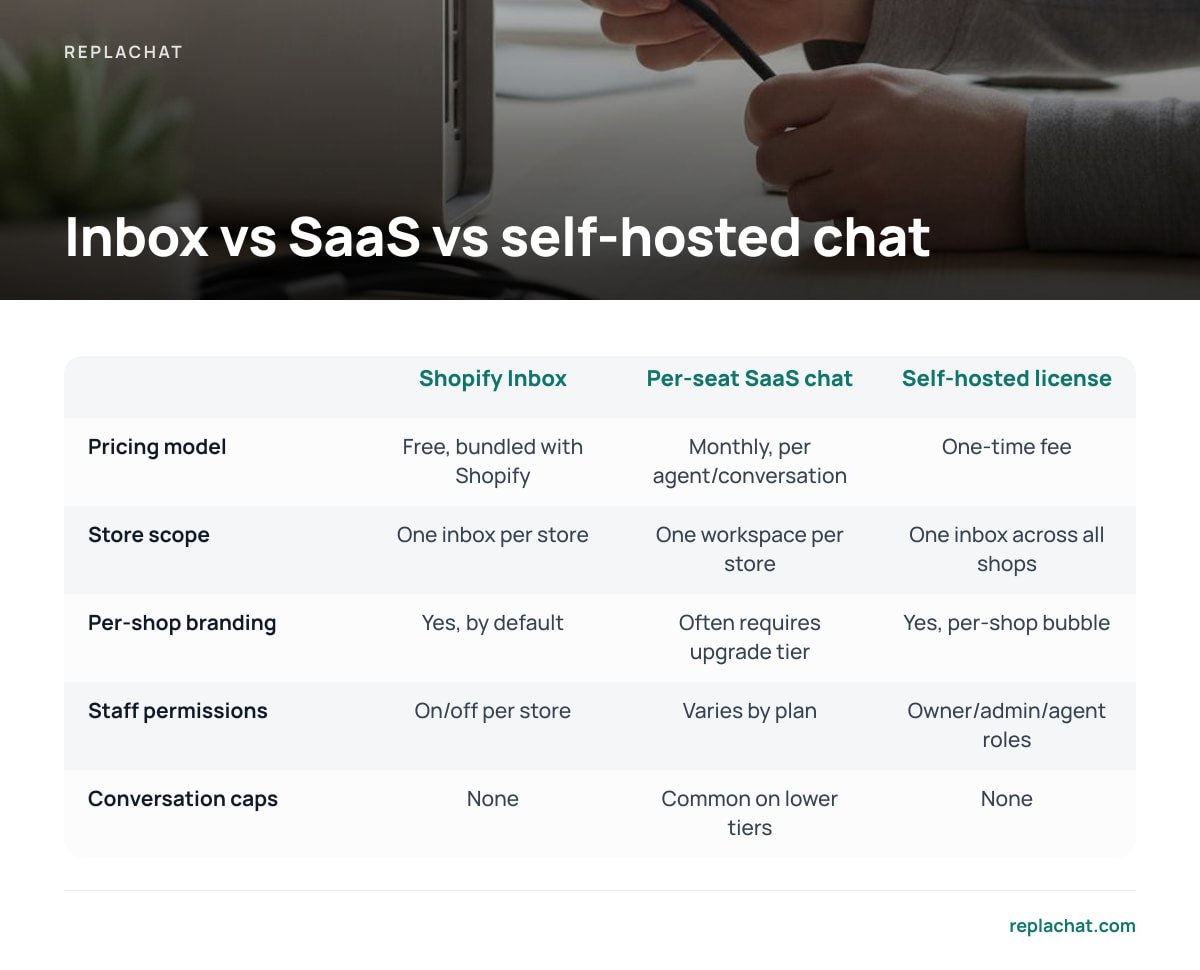
| Shopify Inbox | Typical per-seat SaaS chat | Self-hosted license | |
|---|---|---|---|
| Pricing model | Free, bundled with Shopify | Monthly, scales per agent/conversation | One-time fee |
| Store scope | One inbox per store | Usually one workspace per store, billed separately | One inbox across all shops |
| Per-shop branding | Yes, by default | Often requires upgrade tier | Yes, per-shop bubble |
| Staff permission granularity | On/off per store | Varies by plan | Owner/admin/agent roles |
| Conversation caps | None | Common on lower tiers | None |
Pro Tip: Before adding a second or third chat tool to "fix" the multi-store gap, audit how many conversations actually cross between your stores in a week. If the same customers rarely shop two of your brands, the real cost isn't lost context — it's the hours your team spends logging into separate dashboards, which a unified inbox solves regardless of whether it's SaaS or self-hosted.
When Shopify Magic's AI Replies Help, and When They Misfire
Shopify has layered an AI feature called Shopify Magic into Inbox, which drafts suggested responses based on your store's product descriptions and policy pages. Per Shopify's documentation on Shopify Magic, the draft appears as a suggestion an agent can edit or send as-is.
The catch is that a draft is only as accurate as the store data behind it. If a product page hasn't been updated after a price change, or a return policy page is stale, the AI will confidently repeat the outdated version. Treat every AI-drafted reply as a first pass that needs a human check, especially during sales periods when inventory and pricing move faster than your content does.
Who Owns the Transcript: Data Residency and Retention
Chat transcripts collected through Inbox live on Shopify's infrastructure, governed by Shopify's own retention and data processing terms — you're the data controller, Shopify is the processor, which is standard under the European Commission's GDPR framework for any merchant selling into the EU. That arrangement is normal for SaaS tools generally, but it means you don't set your own retention schedule or control exactly where that data sits.
Separately, if your chat widget sets cookies or uses similar tracking technologies to remember a visitor between pages, the UK Information Commissioner's Office guidance on cookies is a useful baseline for what consent you need to collect before the widget loads, regardless of which chat tool you run.
Self-Hosted Alternatives: What Changes When You Own the Server

A self-hosted chat tool flips the ownership question. Instead of your transcripts living on a vendor's servers under their retention rules, they live on your server under your rules. You decide how long conversations are kept, who can export them, and whether they ever leave your infrastructure. The trade-off is upfront: you need somewhere to host it and someone comfortable doing a one-time setup, rather than clicking "install" inside the Shopify admin.
For a single-store merchant with no appetite for server maintenance, that trade-off usually isn't worth it — Inbox is free and it's already there. For someone running several stores who's tired of juggling logins and watching SaaS seat fees climb every time they add a brand, the math flips the other way.
Get One Inbox for Every Shopify Store You Run
Replachat is self-hosted live chat built for exactly the multi-shop problem this article describes: one inbox for every store you own, with a separately branded chat bubble on each storefront and per-shop control over which team members can answer. It's a $299 one-time license, not a monthly bill, and there's no cap on conversations and no per-agent fee as you add staff or stores.
The honest caveat: self-hosted means you need a server to run it on, and the setup is closer to installing a WordPress plugin than clicking "add app" in Shopify. That's why the license includes the complete source code, 12 months of updates, and 30 days of setup support — and why checking the live demo with five shops and four agents before you buy is worth doing. If you'd rather never touch a server, Inbox remains the simpler default for a single store.
Frequently Asked Questions
Is Shopify Inbox free on every Shopify plan?
Yes, Shopify Inbox ships with every Shopify plan at no extra cost, from Basic through Shopify Plus. It's a native channel inside the Shopify admin, not a separate subscription product you need to buy.
Can one Shopify Inbox account manage chat for multiple stores?
No. Each Shopify store has its own Inbox instance tied to that store's admin, so running five stores means five separate inboxes with separate staff logins and no merged conversation history between them.
Does Shopify Inbox work with older, non-2.0 themes?
Inbox is built for Online Store 2.0 themes. Older vintage themes may need manual template edits or a theme upgrade before the chat bubble displays correctly.
What is Shopify Magic in the context of live chat?
Shopify Magic is Shopify's AI feature that drafts suggested replies inside Inbox based on your store's product and policy content. It speeds up responses but should be reviewed before sending, especially during promotions when pricing or inventory changes quickly.
Is a self-hosted chat tool harder to set up than Shopify Inbox?
It takes more upfront work since you're installing it on your own server rather than clicking "add app," but it removes per-agent and per-conversation fees for good. Tools built for this, like Replachat, include a defined setup support window because that first install is the main point of friction.